
1. 量子比特(Qubit)与叠加原理 (Part 3)
计算空间与资源对比
经典寄存器的线性增长
经典寄存器的状态空间随比特数线性增长:
- 1个比特:2个可能状态 (0, 1)
- 2个比特:4个可能状态 (00, 01, 10, 11)
- n个比特:2ⁿ个可能状态
def classical_state_space():
    """经典状态空间的线性增长"""
    n_bits = [1, 2, 3, 4, 5, 10, 20]

    print("经典寄存器的状态空间:")
    print("比特数 | 状态数 | 描述")
    print("-" * 30)

    for n in n_bits:
        states = 2**n
        if n <= 10:
            print(f"{n:^6} | {states:^7} | 可以枚举所有状态")
        else:
            print(f"{n:^6} | {states:^7} | 状态数巨大,难以枚举")

    print()
    print("经典处理器的局限性:")
    print("- 需要存储所有2ⁿ种可能的输入组合")
    print("- 处理能力随比特数线性增长")
    print("- 需要串行处理或并行硬件")

classical_state_space()
量子态空间的指数增长
量子系统的状态空间虽然也是2ⁿ个基态,但量子叠加允许同时访问所有状态:
def quantum_state_space():
    """量子态空间的指数增长与叠加优势"""
    import numpy as np

    print("量子系统的状态空间:")
    print("量子比特数 | 基态数 | 经典存储需求 | 量子叠加能力")
    print("-" * 60)

    for n in [1, 2, 3, 4, 5, 10, 20]:
        basis_states = 2**n
        classical_storage = basis_states * 16  # 假设每个复数用16字节
        print(f"{n:^10} | {basis_states:^8} | {classical_storage:^14} | 可同时操控所有基态振幅")

    print("\n量子叠加的核心优势:")
    print("- n个量子比特可同时处于2ⁿ个基态的叠加")
    print("- 一次量子操作可同时作用于所有基态")
    print("- 这是量子并行性的数学基础")

quantum_state_space()
常见误解与澄清
常见误解与澄清
“叠加态同时就是 0 和 1”
- 纠偏:叠加不是“既是 0 也是 1”的二元结论,而是一个由复系数描述的线性组合态。|ψ⟩ = α|0⟩ + β|1⟩,其中 α、β 是复数,满足 |α|^2 + |β|^2 = 1。只有在测量时才给出 0 或 1 的单次结果,其概率由 Born 规则给出。
- 直观:Bloch 球上除两极外的任意一点都是叠加态;经典比特在两极“北/南”,量子比特可在整个球面上。
Bloch 球概览
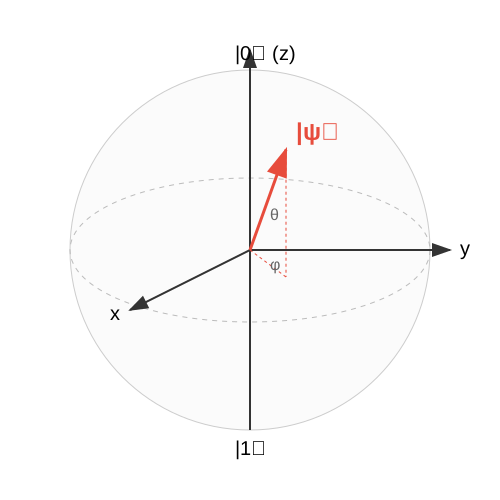
可以用如下 python 代码生成
import math

def generate_bloch_sphere_svg():
    width = 500
    height = 500
    cx = width / 2
    cy = height / 2
    r = 180

    # Colors
    sphere_color = "#f0f0f0"
    axis_color = "#333333"
    vector_color = "#e74c3c"
    text_color = "#000000"

    svg = f'<svg xmlns="http://www.w3.org/2000/svg" viewBox="0 0 {width} {height}" width="{width}" height="{height}">'

    # Definitions for arrow markers
    svg += '''
    <defs>
        <marker id="arrowhead" markerWidth="10" markerHeight="7" refX="9" refY="3.5" orient="auto">
            <polygon points="0 0, 10 3.5, 0 7" fill="#333333" />
        </marker>
        <marker id="arrowhead_red" markerWidth="10" markerHeight="7" refX="9" refY="3.5" orient="auto">
            <polygon points="0 0, 10 3.5, 0 7" fill="#e74c3c" />
        </marker>
    </defs>
    '''

    # 1. Sphere Outline (Circle)
    svg += f'<circle cx="{cx}" cy="{cy}" r="{r}" fill="{sphere_color}" stroke="#cccccc" stroke-width="1" fill-opacity="0.3" />'

    # 2. Equator (Ellipse)
    # Perspective: x-axis coming out, y-axis right, z-axis up
    # We simulate a 3D view.
    # Let's say we look slightly from above.

    # Simplified view:
    # Z axis vertical
    # Y axis horizontal (slightly tilted?)
    # X axis diagonal

    # Let's draw the equator as an ellipse to show 3D
    rx = r
    ry = r * 0.4 # flattened
    svg += f'<ellipse cx="{cx}" cy="{cy}" rx="{rx}" ry="{ry}" fill="none" stroke="#bbbbbb" stroke-width="1" stroke-dasharray="5,5" />'

    # 3. Axes
    # Z-axis (Vertical)
    svg += f'<line x1="{cx}" y1="{cy+r}" x2="{cx}" y2="{cy-r}" stroke="{axis_color}" stroke-width="2" />' # Main line inside?
    # Actually, we want axes to go through center.

    # Z axis from center to top
    svg += f'<line x1="{cx}" y1="{cy}" x2="{cx}" y2="{cy-r-20}" stroke="{axis_color}" stroke-width="2" marker-end="url(#arrowhead)" />'
    # Z axis from center to bottom (dashed inside?)
    # Let's just draw the visible parts or full axis.

    # X axis (coming out to bottom-left)
    # angle ~ 135 degrees (225 degrees mathematical)
    x_angle = math.radians(135)
    x_len = r + 20
    x2 = cx - x_len * 0.6 # perspective foreshortening
    y2 = cy + x_len * 0.6 * 0.5 # slightly flattened y
    svg += f'<line x1="{cx}" y1="{cy}" x2="{x2}" y2="{y2}" stroke="{axis_color}" stroke-width="2" marker-end="url(#arrowhead)" />'

    # Y axis (going right)
    y_len = r + 20
    svg += f'<line x1="{cx}" y1="{cy}" x2="{cx+y_len}" y2="{cy}" stroke="{axis_color}" stroke-width="2" marker-end="url(#arrowhead)" />'

    # Labels
    svg += f'<text x="{cx-15}" y="{cy-r-10}" font-family="Arial" font-size="20" fill="{text_color}">|0⟩ (z)</text>'
    svg += f'<text x="{cx-15}" y="{cy+r+25}" font-family="Arial" font-size="20" fill="{text_color}">|1⟩</text>'
    svg += f'<text x="{cx+y_len+10}" y="{cy+5}" font-family="Arial" font-size="20" fill="{text_color}">y</text>'
    svg += f'<text x="{x2-20}" y="{y2+10}" font-family="Arial" font-size="20" fill="{text_color}">x</text>'

    # 4. State Vector |psi>
    # Theta = 45 deg, Phi = 45 deg
    theta = math.radians(45)
    phi = math.radians(45)

    # Projection to 2D
    # x = r * sin(theta) * cos(phi)
    # y = r * sin(theta) * sin(phi)
    # z = r * cos(theta)

    # Map 3D coords to 2D SVG coords
    # SVG X = cx + y_3d - x_3d * 0.5 (simple cavalier-ish projection? No, let's match the axes)

    # Our Axes:
    # Z_svg is up (-y direction)
    # Y_svg is right (+x direction)
    # X_svg is down-left

    # Let's define the basis vectors in SVG coords
    # origin = (cx, cy)
    # unit_z = (0, -r)
    # unit_y = (r, 0)
    # unit_x = (-r*0.6, r*0.3) # Approximate for perspective

    vec_len = r

    # 3D components of the vector
    v_x = math.sin(theta) * math.cos(phi)
    v_y = math.sin(theta) * math.sin(phi)
    v_z = math.cos(theta)

    # SVG coordinates
    svg_vx = cx + v_x * (-r * 0.6) + v_y * (r)
    svg_vy = cy + v_x * (r * 0.3) + v_y * (0) - v_z * (r)

    # Draw vector line
    svg += f'<line x1="{cx}" y1="{cy}" x2="{svg_vx}" y2="{svg_vy}" stroke="{vector_color}" stroke-width="3" marker-end="url(#arrowhead_red)" />'

    # Draw projection lines to show theta and phi
    # Projection on xy plane (equator)
    proj_vx = cx + v_x * (-r * 0.6) + v_y * (r)
    proj_vy = cy + v_x * (r * 0.3) + v_y * (0) # z component is 0

    svg += f'<line x1="{cx}" y1="{cy}" x2="{proj_vx}" y2="{proj_vy}" stroke="{vector_color}" stroke-width="1" stroke-dasharray="3,3" />'
    svg += f'<line x1="{svg_vx}" y1="{svg_vy}" x2="{proj_vx}" y2="{proj_vy}" stroke="{vector_color}" stroke-width="1" stroke-dasharray="3,3" />'

    # Arc for Phi
    # simple curve from X axis to projection
    # Not trivial to draw perfect elliptical arc, let's just label it

    # Label |psi>
    svg += f'<text x="{svg_vx+10}" y="{svg_vy-10}" font-family="Arial" font-size="24" font-weight="bold" fill="{vector_color}">|ψ⟩</text>'

    # Label Theta and Phi roughly
    svg += f'<text x="{cx+20}" y="{cy-30}" font-family="Arial" font-size="16" fill="#666">θ</text>'
    svg += f'<text x="{cx+20}" y="{cy+20}" font-family="Arial" font-size="16" fill="#666">φ</text>'

    svg += '</svg>'

    return svg

if __name__ == "__main__":
    svg_content = generate_bloch_sphere_svg()
    with open("bloch_sphere.svg", "w", encoding="utf-8") as f:
        f.write(svg_content)
    print("SVG generated successfully.")